
SureLock Lockdown for Samsung3.68.66 - Google Play
You'll be able to see results in few seconds.
Publisher Description
Note 1: For Samsung devices only. Do NOT use this version on Samsung rooted devices or custom ROM devices.
Note 2: For enterprise use only
Note 3: Free version has some limitations. Purchase a license to activate it to full version. In case of any problems please contact techsupport@42gears.com
Lock down your Samsung Android Tablets and Smart Phones into kiosk mode with SureLock.
Salient features :
* Disable Samsung Mini Apps button
* Hide Android bottom bar (NO rooting required)
* Peripheral lockdown (mobile data, GPS, WiFi, Bluetooth, Auto rotation, Airplane or Flight mode, Audio)
More features :
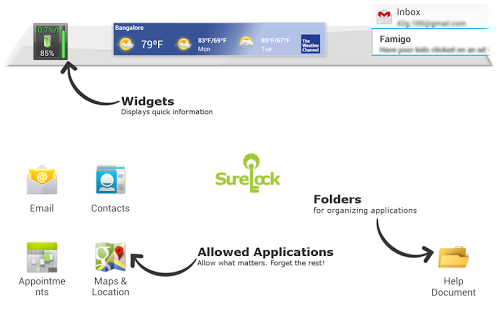
* Restrict users to allowed applications only
* Show only selected Widgets (e.g. battery, wifi, weather etc) on SureLock Home screen and change their layout as you want
* Arrange allowed applications in Categories on Home screen
* Block user from playing games, browsing or installing unapproved applications, Complete Device Lock
* Block user from changing System Settings
* Admin can securely unlock the device with a password
* Selectively allow or block individual child windows of any application
* Per application password control
* Brand SureLock with your own corporate logo
* Auto launch application(s) at startup
* Custom title for allowed applications on home screen
* Hide icon : Allow an application without showing it on home screen
* Modify SureLock Settings right from SureMDM Web console
* Phone Locking feature: Whitelist/Blacklist phone numbers
* Set custom wallpaper on SureLock Home screen
* Relocate icons anywhere on the screen by using drag and drop
* Import/Export settings to xml
* Remotely deploy SureLock configuration (http or file transfer)
* Easily integrates SureFox (Special lockdown browser to restrict browsing to certain websites only)
How to exit SureLock?
---------------------
Tap in the empty area SureLock home screen 5 times within 3 seconds. Password prompt will be presented.
How to exit SureLock Single Application Mode?
---------------------------------------------
http://www.42gears.com/blog/2012/01/how-to-exit-single-application-mode-in-surelock/
Documentation
-------------
Check out online documentation at http://www.42gears.com/surelock/docs/android/index.html
About SureLock Lockdown for Samsung
The company that develops SureLock Lockdown for Samsung is 42Gears Mobility Systems. The latest version released by its developer is 3.68.66.
To install SureLock Lockdown for Samsung on your Android device, just click the green Continue To App button above to start the installation process. The app is listed on our website since 2014-05-13 and was downloaded 0 times. We have already checked if the download link is safe, however for your own protection we recommend that you scan the downloaded app with your antivirus. Your antivirus may detect the SureLock Lockdown for Samsung as malware as malware if the download link to com.gears42.surelocksam is broken.
How to install SureLock Lockdown for Samsung on your Android device:
- Click on the Continue To App button on our website. This will redirect you to Google Play.
- Once the SureLock Lockdown for Samsung is shown in the Google Play listing of your Android device, you can start its download and installation. Tap on the Install button located below the search bar and to the right of the app icon.
- A pop-up window with the permissions required by SureLock Lockdown for Samsung will be shown. Click on Accept to continue the process.
- SureLock Lockdown for Samsung will be downloaded onto your device, displaying a progress. Once the download completes, the installation will start and you'll get a notification after the installation is finished.
Program Details
System requirements
Download information
Pricing
Version History
version 3.68.66
posted on 2014-05-13
version 3.68.12
posted on 2013-06-09
Several fixes and updates
Disclaimer
Official Google Play Link
We do not host SureLock Lockdown for Samsung on our servers. We did not scan it for viruses, adware, spyware or other type of malware. This app is hosted by Google and passed their terms and conditions to be listed there. We recommend caution when installing it.
The Google Play link for SureLock Lockdown for Samsung is provided to you by apps112.com without any warranties, representations or guarantees of any kind, so access it at your own risk.
If you have questions regarding this particular app contact the publisher directly. For questions about the functionalities of apps112.com contact us.
